
Let Your Kids Track the Family Budget: Less Work for You, Money Lessons for Them
Updated
The most common reason people give up on budgeting is that logging every expense is a chore. So why not hand that chore to your kids? With a budgeting app that feels like a game, they might actually ask to do it. Here is how to get your kids tracking the family budget.
Starting a budget is easy. Keeping it going is the hard part. Between work and everything at home, finding time to sit down with a pile of receipts and enter them one by one is harder than it sounds.
That is where this idea comes in: let your kids do the logging. Your only job is to hand over the receipts. When your kids record them, the budget keeps going, you have more to talk about as a family, and your kids pick up money skills along the way.
3 reasons to let your kids track the family budget
1. You no longer have to log everything yourself
All you do is drop your receipts in one spot after shopping. Your kids take care of the rest. The pressure of "I really need to keep up with the budget" no longer sits only on you.
2. It starts real conversations
When kids log receipts, they ask questions like "What is this?" or "Why does this cost so much?" Just answering them turns into a natural conversation about money. "What did we buy at the store today?" is an easy topic for kids to talk about, too.
3. It teaches kids about money
After logging for a while, kids start to notice things like:
- What everyday items cost, from milk and bread to dish soap
- That one grocery trip costs more than they expected
- That money is sorted by purpose, such as groceries or household supplies
- Roughly how much it costs to run a household for a month
Learning from your own family's receipts sticks far better than learning from a textbook.
Pick a system your kids actually want to use
Handing your kids a notebook budget is unlikely to last. Even adults struggle to keep that up.
If you are handing the job to your kids, the fastest route is a system where logging itself is fun.
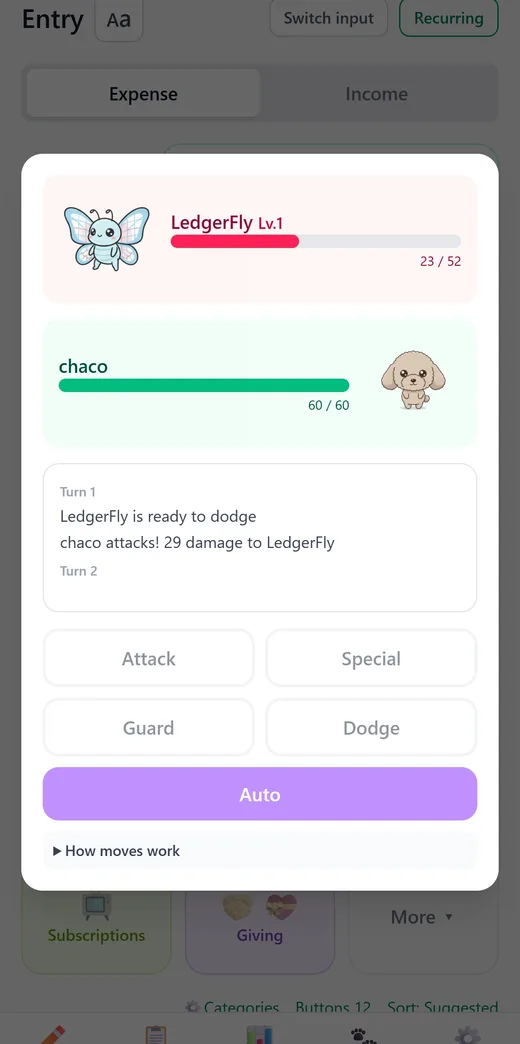
Moneypet is a budgeting app where every expense you log earns food for your pet. Each time your kids log something, the pet reacts with a short comment. Sometimes an enemy appears, and they battle it together with the pet. There is also a travel mode where the pet visits landmarks around the world, and an egg mode where they collect insects.
Because entering a receipt moves the game forward, logging stops being a chore your kids were asked to do and becomes part of the game.
How to get started
1. Pick one place for receipts
Choose a box or tray where receipts go after every shopping trip. That is all you need to do. Just make sure receipts do not stay buried in your wallet.
2. Decide together how your kids will log
There are two main ways to let your kids keep the family budget.
| Option | How it works | Good for |
|---|---|---|
| Use the family budget on a shared device | Hand your kids a tablet or spare phone that is signed in to your account | Families who want the easiest start |
| Give your child their own account in your family group | Your child creates an account and joins your family sharing group | Families who want their child to raise their own pet |
With family sharing, you can see each member's entries and a combined report for the whole family. For anything you would rather your kids not see, such as your paycheck, turn on "Hide from family" when you log it, and it will not appear on their screen.
If your child is a minor, a parent or guardian should agree to the app's use and set it up together with them. Keep paid features under a parent's control, and consider turning on purchase approvals (parental controls) on the phone or tablet.
3. Receipts only need a photo
In Moneypet, taking a photo of a receipt fills in the amount, date, and category automatically. You can even capture several receipts at once. Your kids just check that everything looks right.
On the free plan, receipt scanning has a daily limit. On days when you hit it, enter expenses by hand or save the rest for the next day.
4. Review together once a week
Pick a day, such as the weekend, and look at the report together. Asking "What did we spend the most on this week?" is enough. Let your kids come up with the answer.
Tips for handing it over
- 1Do not scold mistakes. A wrong category or a slightly off amount is fine. Fix it together during your weekly review.
- 2Say thank you. Kids love being trusted with a real household job and being thanked for it.
- 3Do not hand over everything at once. It does not have to be daily. Logging in one batch on the weekend works too. Agree on a pace your kids can keep.
- 4Do not make money worries their burden. Instead of complaining that money is tight this month, keep it positive: "Let's figure out together how to use it."
What age can kids start?
A good sign is when your child can add and subtract and read the numbers on a receipt. Many families find that around ages 8 to 10 works well. With younger kids, try splitting the job: the child takes the photo, and a parent checks it.
If your child also wants to track their own allowance, our article on keeping a kids' allowance tracker may help.
Hand the budget to your kids and their pet. It is free to get started.
Summary
- Letting your kids log the family budget saves you time
- Talking over receipts becomes quality family conversation
- Kids learn what things cost and what it takes to run a household
- To keep it going, choose a system where logging feels like a game
- Do not scold mistakes, review once a week, and say thank you
Moneypet is a budgeting app where logging your spending earns food for your pet. Send your pet traveling and hatch insects from eggs, so you actually want to open it every day. Free to start.