
Best Budgeting Apps 2026: Choose by Type, Not by Ranking
Updated
There is no single best budgeting app, only the one that fits how you handle money. Figure out why you want to budget and where you gave up last time, then pick by type.
This article was written by the team that makes Moneypet, and it includes our own app. We describe the other apps as fairly as we can, based on what they publicly say about themselves. Information is current as of October 2026. Prices, features and bank sync coverage change and differ by country, so check each app's store page or website before you download.
Search for the best budgeting apps and every list crowns a different winner, which makes the choice harder, not easier. Each app is built around a different idea of budgeting. Instead of hunting for the strongest one, start by figuring out which kind you need.
Three questions before you pick a budgeting app
- 1Automatic or manual? Bank sync saves time but means connecting your accounts. Logging by hand takes a few seconds per purchase, but you notice every dollar you spend.
- 2Just you, or with a partner? If you manage money together, choose an app built for sharing.
- 3Where did you quit last time? Too much typing, confusing reports, or you simply forgot to open the app? Your reason for quitting is the best clue for what to pick next.
Best budgeting apps by type
| Type | App | Good for | Keep in mind |
|---|---|---|---|
| Strict, every-dollar budgeting | YNAB | People who want to give every dollar a job | Paid only after a free trial; it takes time to learn the method |
| Couples and shared finances | Monarch Money | Partners who want one view of accounts and goals | Paid only after a free trial |
| Simple zero-based budget | EveryDollar | People who like a step-by-step plan | The free version is manual entry; bank sync is paid |
| Envelope method | Goodbudget | People who like the cash-envelope idea | The free plan limits envelopes and devices |
| You always give up | Moneypet | People who have quit several apps already | No bank sync; you log purchases yourself |
Bank sync in many of these apps is built mainly for the US (and sometimes Canada or the UK). If you live elsewhere, check whether your bank is supported before paying.
What each budgeting app does best
Strict budgeting: YNAB
YNAB (You Need A Budget) is built around zero-based budgeting: every dollar you have gets a job before you spend it. It is known for teaching a method, not just tracking numbers. There is no free plan after the trial, and the method takes some getting used to, but people who stick with it often say it changed how they think about money.
For couples: Monarch Money
Monarch Money brings accounts, spending and goals into one place and is often recommended for couples who want to share a single view of their finances. Like YNAB, it is a paid app after a free trial.
Step-by-step plan: EveryDollar
EveryDollar also uses zero-based budgeting, with a simple monthly plan. The free version works if you are willing to enter transactions yourself; connecting your bank is part of the paid plan.
Envelope method: Goodbudget
Goodbudget is a digital version of the cash-envelope system: you fill envelopes for groceries, gas and fun, then spend from them. It has a free plan with a limited number of envelopes and devices, and it is popular with couples who want to see the same envelopes.
If you always give up: Moneypet
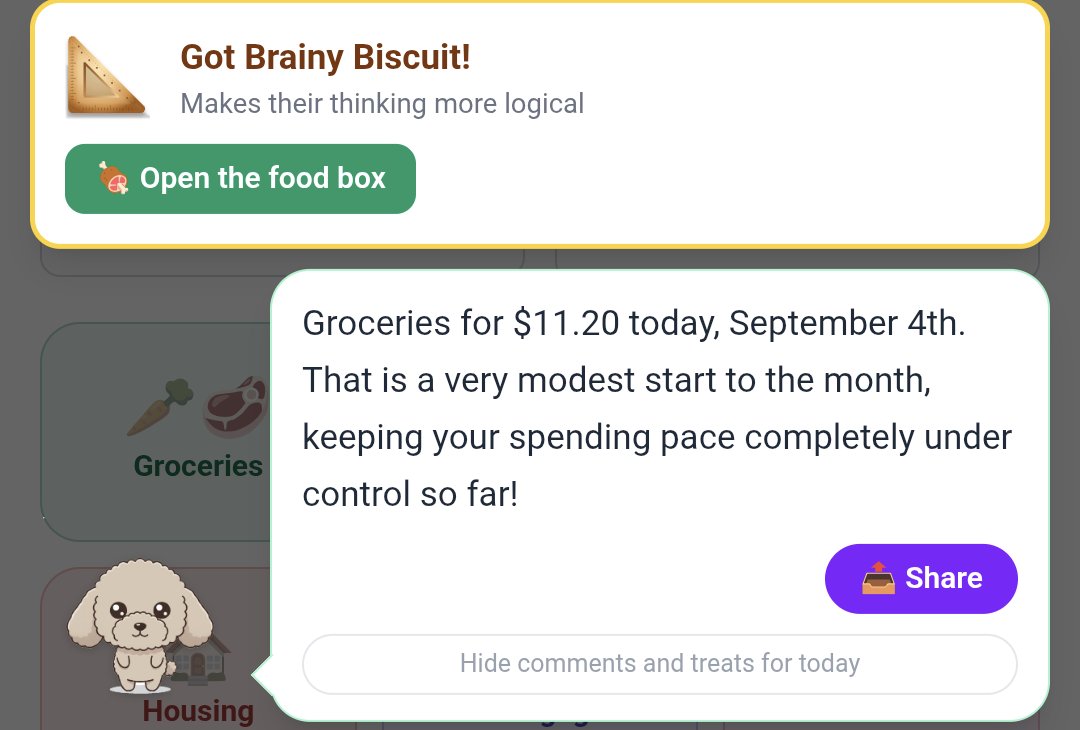
Moneypet is the app we make. Every time you log a purchase, you earn food for your pet, and the pet comments on what you logged, sometimes with a little teasing. Feed it different foods and its personality and look change. You can log by taking a photo of a receipt, by voice, or by typing as if you were chatting, and recurring bills such as rent or subscriptions are recorded automatically every month once you set them up. You can share a budget with family, use multiple currencies, and start for free.
Moneypet does not connect to banks or credit cards, so every purchase is logged by you. If you want an app that needs no effort at all, a bank-sync app is a better fit. If your real problem is forgetting after three days, a pet that waits for you might be what keeps you going.
When you still can't stick with it
If you have switched apps several times and still stop, the app is often not the problem. Try these first:
- Track spending only. You don't need income, savings and investments on day one. Build the habit of logging what you spend.
- Don't chase perfect numbers. Missing a purchase or two is fine. Consistency beats accuracy.
- Pick a fixed moment. Log right after something you already do every day, like your commute or brushing your teeth.
- Start with fewer categories. Around ten broad categories is plenty at first.
FAQ
Do budgeting apps cost money?
All the apps in this article let you start for free, either with a free plan or a free trial. Use the free version first to see whether you actually keep using it, then decide whether paying is worth it.
Is automatic or manual tracking better?
Automatic tracking saves time and suits people with many accounts. Manual tracking makes you see each purchase, which makes it easier to notice where money goes. Neither is better; it depends on which problem you are trying to solve.
Can I use two apps at once?
Yes. Some people use a bank-sync app to see their accounts and a simpler app for daily spending. When you are just starting, though, focus on one app until the habit sticks.
If you have tried several budgeting apps and quit every time, give Moneypet a try: each purchase you log earns food for your pet and gets a comment back. Log by receipt photo, voice or chat, and start for free.
Moneypet is a budgeting app where logging your spending earns food for your pet. Send your pet traveling and hatch insects from eggs, so you actually want to open it every day. Free to start.