
Kids' Allowance Tracker: 7 Ways to Help Your Child Keep It Up
Updated
Bought your child an allowance notebook, only to find it blank three days later? It is usually not laziness. We often expect kids to track money the way adults keep a budget.
An allowance tracker is not just math practice. It is where kids practice deciding how to spend their own money and then looking back on how it went. But none of that happens if the tracking stops after a week.
Here are seven ways parents can help a child keep an allowance tracker going, without turning it into a chore.
1. Make the goal "practice deciding," not "saving money"
If the allowance tracker becomes a way to catch wasteful spending, your child is basically writing down evidence against themselves. No wonder it stops.
The real goal is choosing where their money goes, then thinking about how it turned out. Even if it all went to candy, a child who decided, wrote it down and looked back has used the tracker exactly right.
When you feel like commenting on how the money was spent, praise the fact that it was written down first. Talk about spending choices once tracking has become a habit.
2. Cut the columns to the bare minimum
Store-bought allowance books often have columns for date, item, money in, money out and balance. For younger kids, three things are plenty at first.
- What they bought (or where the money came from)
- How much it was
- How much is left
Add the date once that feels easy. Older kids can start sorting spending into a few groups like snacks, school supplies and fun.
3. Decide when to write it down
"Write it down right after you spend" is hard even for adults. For kids, it works better to attach tracking to something they already do every day.
- Write down "money in" on the day they get their allowance
- Write it down after coming home from the store and washing hands
- Write it down after dinner, looking at the receipt
Pick just one. A small box for receipts and coins also cuts down on "I forgot what I bought."
4. Do not scold when the balance is off
The cash in the wallet and the balance in the book not matching happens with adult budgets too. If you dig into why, your child may start to dislike the tracker itself.
If it is off by a little, write "not sure" and match the balance to the wallet. Only search for receipts together when the gap is big. A balance that is a bit off is far better than a tracker that gets abandoned.
5. Review together instead of checking up
If a parent checks the book every day, it becomes homework. A better rhythm is once a month, on allowance day, looking through it together.
Swap criticism for questions that help your child think it through.
| What we tend to say | What helps them think |
|---|---|
| Candy again? | What was your best buy this month? |
| Why did you spend so much? | Is there anything you regretted a little after buying it? |
| You should save more. | Is there something you want next month? |
| Write it properly. | Look what you can see now that you wrote it down. |
6. Set a savings goal together
An allowance tracker is most useful when there is something your child wants. A game, a book, a day out with friends. With a goal a little further away, kids start thinking, "I will spend up to here this month and save the rest."
Try a savings chart: write the goal amount and color in the bar as the money grows. Even kids who are not into numbers can see how far they have come.
7. Add small rewards along the way
The payoff of an allowance tracker (getting better with money) takes months to show. Small rewards each time help bridge the gap.
- A sticker on every day they write something down
- After a full month, they get to pick a new pen in their favorite color
- An app that works like a game, where logging earns points or items
Notebook or app for a kids' allowance tracker?
There is no single right answer. Choose based on your child's age and what they will actually enjoy.
| Option | Good fit for | Watch out for |
|---|---|---|
| Notebook | Kids who like writing and could use the math practice | Small adding or subtracting mistakes make the balance drift |
| App | Kids comfortable with phones or tablets who love games | Agree on screen time and in-app purchase rules as a family first |
If you use an app, set it up together with your child and agree on screen time and paid features before they start.
Every family handles money a little differently. This article shares general ideas only. Decide the allowance amount and how you give it based on your own family's approach.
Moneypet: an allowance tracker that feels like a game
Moneypet is a budgeting app where logging comes back as fun, and it works well as an allowance tracker. Each time your child enters an amount and what it was for, their pet comments on it and earns food. Feeding the pet changes its personality and how it looks.
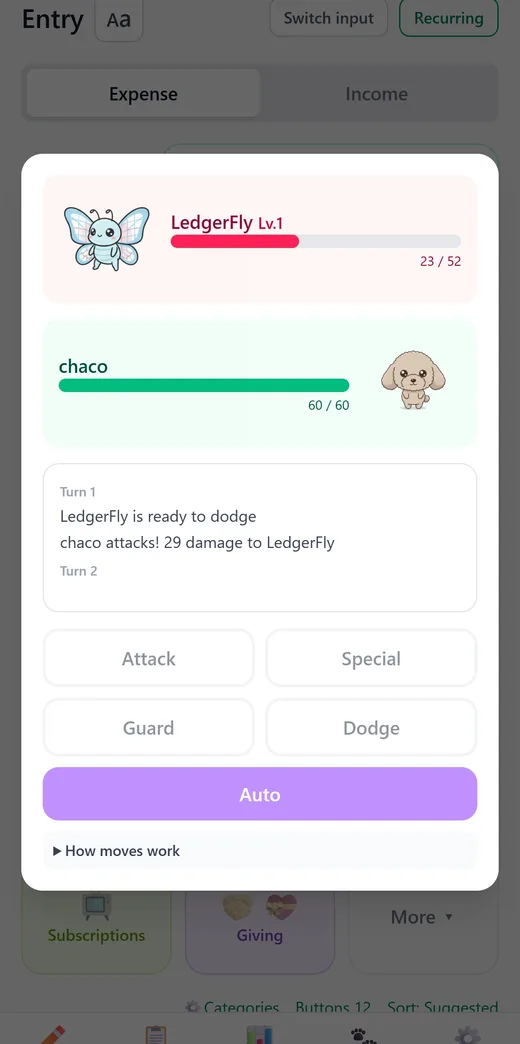
There is also Battle mode, where foes sometimes appear after logging. Your child picks Attack, Special, Guard or Dodge and fights alongside their pet, and defeated foes may even join the team. If you would rather skip the game, it can be turned off in Settings.
Saved-up food can also hatch more than 3,200 kinds of real insects from eggs, or send the pet traveling to landmarks around the world. When typing is too much, snapping a receipt reads the amount and date, or your child can just say something like "candy 2 dollars."
Kids log because they want to keep playing, not because they have to. Since your child can track money the way they play a game, the allowance tracker lasts much longer.
Start an allowance tracker with a pet. It is free to get started.
Moneypet is a budgeting app where logging your spending earns food for your pet. Send your pet traveling and hatch insects from eggs, so you actually want to open it every day. Free to start.