
How to play battle mode: fight enemies with your pet after logging
Updated
Turn on battle mode and enemies sometimes appear after you log an entry, so you can fight them with your pet. Winning levels up your pet, and defeated enemies sometimes join you as allies.
Turn on battle mode
Turn battle mode on or off under "Game mode" in Settings. When it's on, "Battle mode" appears on the Pet screen, where you can check stats, your party, waiting opponents and more.
When an enemy appears
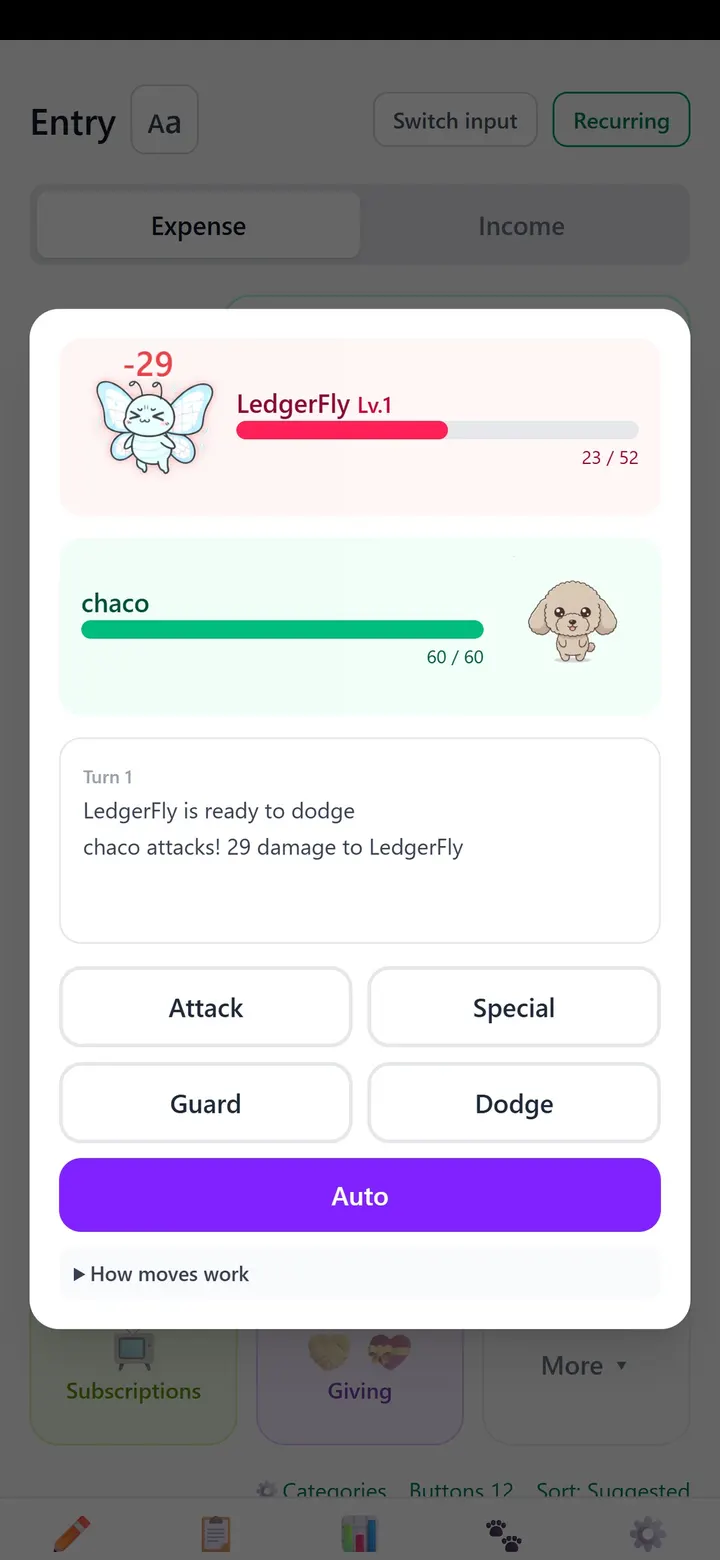
- 1After you log an entry and close your pet's comment, an enemy sometimes appears.
- 2Tap "Fight" to start the battle right away. If you'd rather fight later, tap "Later" to save it under "Waiting opponents" on the battle screen.
- 3Each turn, choose a move from the buttons at the bottom. Tap "Auto" to fight automatically until the end.
- 4Bring the opponent's HP to 0 to win.
Choosing moves
| Move | What it does |
|---|---|
| Attack | A normal attack. Less effective against opponents who Guard or Dodge |
| Special | A powerful attack. But if it's dodged, it misses and you trip |
| Guard | Strong against Attack, and makes your next Attack stronger |
| Dodge | Makes it easier to avoid Attack and Special. Weak against opponents who Guard |
| Auto | Picks moves automatically and fights to the end |
The trick is to think about what your opponent is likely to do. If your pet's Cuteness is higher than the opponent's, the opponent may be too charmed to attack. See "How moves work" on the battle screen for details.
Levels and stats
Winning earns experience points. Your pet also gains experience when you feed it. Leveling up gives you more points, which you can spend on the battle screen to raise any stat you like: HP, Attack, Defense, Speed or Cuteness.
If you lose, you may get a chance to fight the same opponent again.
Allies and your party
Defeated enemies sometimes want to join you. Feeding them after you win makes them more likely to join. Put allies in your "Party" on the battle screen to fight together.
Your party has two members: a Leader and a Reserve. Only the Leader fights, while the Reserve cheers them on and sometimes helps by attacking or healing.
Gear
Under "Gear" in the party section, you can bring travel souvenirs or insects from egg mode. Bringing them raises your stats, and rarer items raise them more (only the Leader gets the effect, and items aren't used up). Things you collect in travel mode and egg mode come in handy in battle too.
The Enemy Guide and bosses
The "Enemy Guide" on the battle screen lists the enemies you've met. Enemies you haven't met appear as silhouettes with "???". Meet one to see its picture and name, and beat it to read its description.
Once a month, when you use budgeting features like the report card or budget, a very strong boss may appear. Train your pet and allies well before you take it on.
Send your pet into other people's battles
If you've published a pet you made in Everyone's pets, you can put it up as an opponent in other people's battles with "Send my pet into other people's battles" on the battle screen. When it wins as an opponent, you get food (there's a daily limit).
FAQ
What if I don't want enemies to appear today?
Tap "Later" when one appears and you won't have to fight right then. Turn on "Always save opponents for later" on the battle screen, and instead of showing the battle screen each time, you'll just get a small notice at the bottom.
How do I turn off battle mode?
Turn it off under "Game mode" in Settings. You can turn it back on any time.
What if I can't beat a strong enemy?
Try feeding your pet to level it up, spending points on stats, or rethinking your allies and gear. The more you keep logging, the stronger your pet gets.
Grow stronger with your pet every time you log. Turn on battle mode and give it a try.